OpenCAD
Computer-aided dispatch that every console sees at the same moment
OpenCAD is a browser-based dispatch system for police, fire, EMS and public works. Dispatchers take calls and send units. Crews update their status from the field. Supervisors watch the whole operation live. There's nothing to install on the dispatch floor or in the vehicles: if it has a modern web browser, it can run OpenCAD.
Run it on your own servers for $12,000 a year, or let us host it for $18,000 a year. Either way, there are no limits on users, consoles or units.
Coming soon: native apps for macOS, Windows and iOS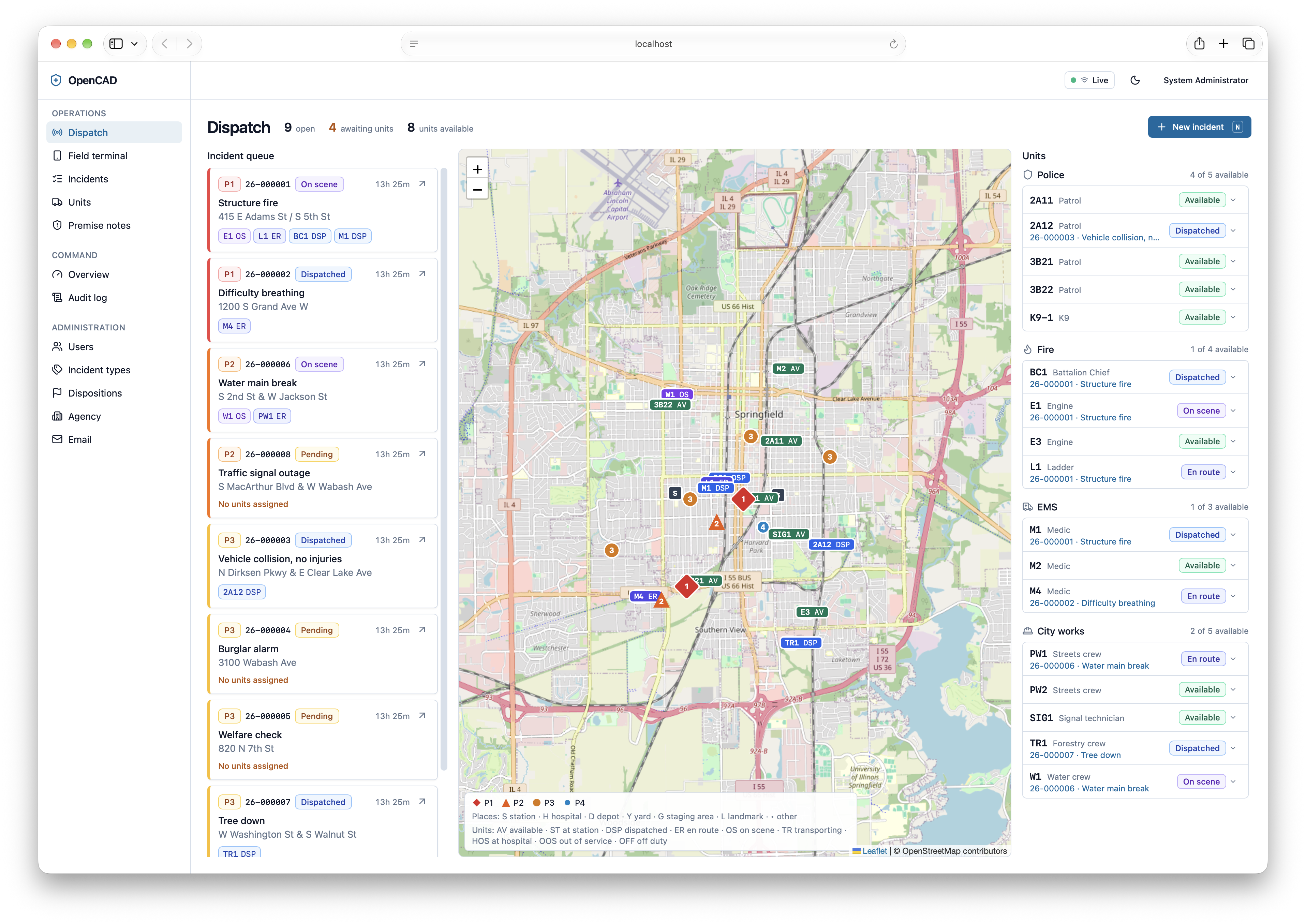
Built for
Dispatch for police, fire, EMS and public works
Municipal and county dispatch centers
Send police, fire, EMS and city crews from one floor.
Smaller agencies
Get a real CAD without a large up-front installation project.
Command centers and public works departments
Coordinate crews, yards and depots around a city.
Why OpenCAD
Why agencies choose OpenCAD
- One live picture, on every screen
- A call entered at one console appears on every other console, the dispatch map and the field terminals within a fraction of a second. A dropped connection is flagged in the header and catches up on its own, so no one works from a stale board.
- Rules that hold under pressure
- A unit can be on only one call at a time, and the database enforces it. Two dispatchers clicking at the same moment cannot double-book a unit. If every unit clears from an open call, the call goes back to the pending queue, so nothing sits unattended.
- Safety information when it matters
- Officer-safety cautions, hazardous materials, aggressive animals and gate codes appear while the call is still being typed in. The same notes show on the incident and on the crew's field terminal, with cautions first.
- Fast to set up, simple to run
- Your administrator sets the agency's name, time zone, map, stations, call types, dispositions, alert thresholds and email from inside the app. No consultants and no configuration files.
- Simple, predictable pricing
- One yearly fee covers your whole agency. Add every dispatcher, supervisor and crew member, every console and every unit, with no per-seat charges and no surprises at renewal when you grow.
Features
Built for everyone on the operation
Dispatchers, field crews, supervisors and administrators each get a view made for their job.
For dispatchers
Take the call, find the unit, send it
Everything a dispatcher needs is on one board: the queue, the map and every unit.
Live incident queue. Sorted by priority and age. A call waiting too long for its priority is flagged Overdue, and the count shows in the board’s header.
Dispatch map. Every open incident, every unit with its status, and your stations, hospitals and other key locations.
Unit board. Grouped by police, fire, EMS and city works. Select a call and the units that can take it are highlighted; one click dispatches.
Nearest-unit recommendations. For each call, filtered to the right discipline. Units in quarters are measured from their station.
Fast call intake. Press N from the board to open a new call. The priority defaults from the call type.
Address search. Suggests addresses and your own key locations as you type, and places the call on the map. Clicking the map fills in the address. A suggestion in a distant town with the same street name is flagged so it isn’t picked by mistake.
Move a unit between calls. In one action, without clearing it and dispatching it again.
Change priority. On an open call in one step, with every change recorded on the timeline.
Full incident record. Assigned units with en route, on scene and cleared times; the notes narrative; and a complete timeline of who did what, and when.
Close or cancel with a disposition. From your agency’s own list.
For crews in the field
A field terminal built for a tablet in a vehicle
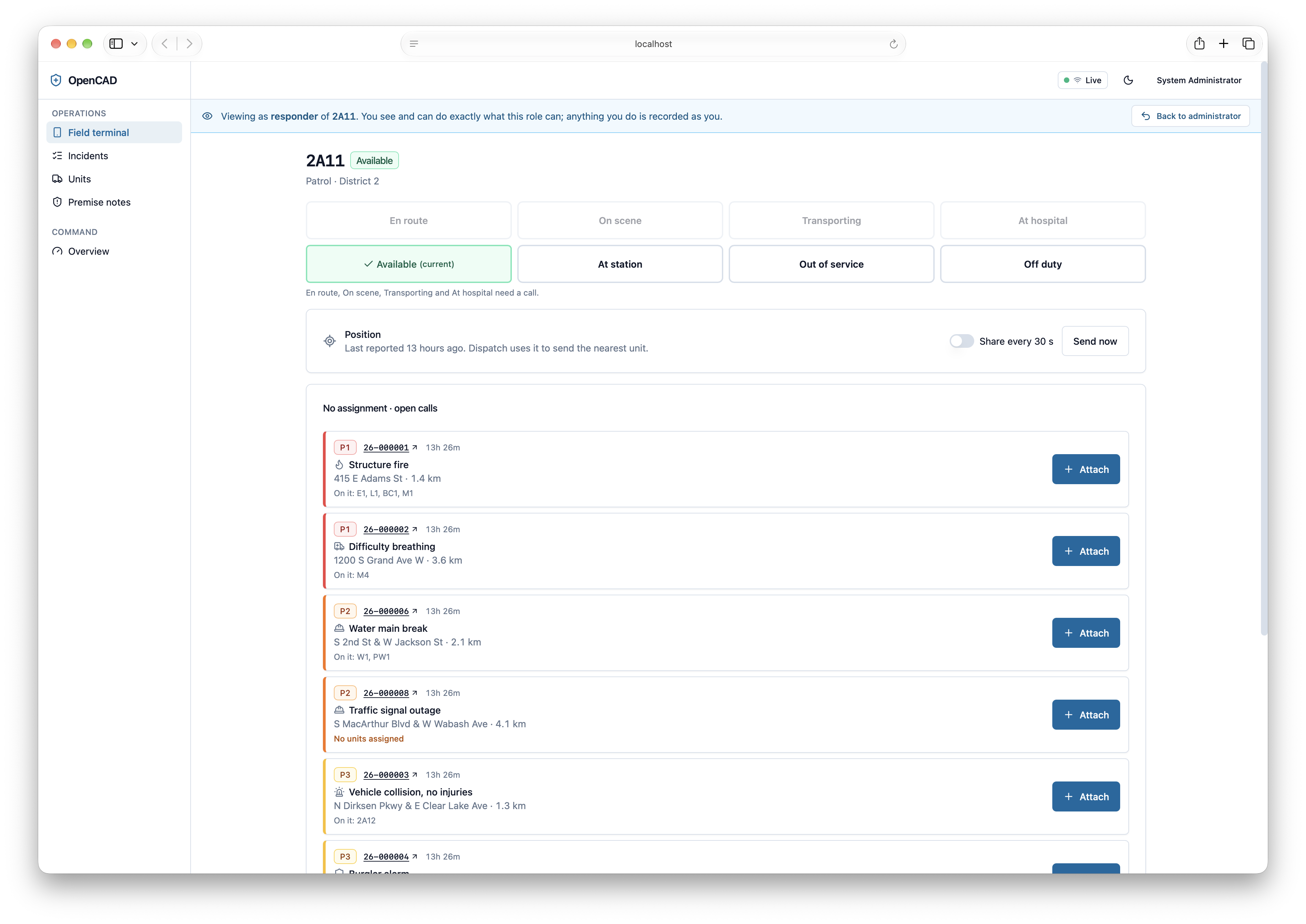
Crews update their status from the field with large, easy-to-hit buttons.
Large status buttons. En route, on scene, transporting, at hospital, available, at station and more.
The current call at a glance. Address, map link, callback number, notes and premise cautions.
Location sharing. Dispatch sees where units actually are.
Self-dispatch. With no call assigned, crews see open calls with their distance and can attach their unit. The timeline records it as self-dispatched.
For supervisors
Watch the whole operation live
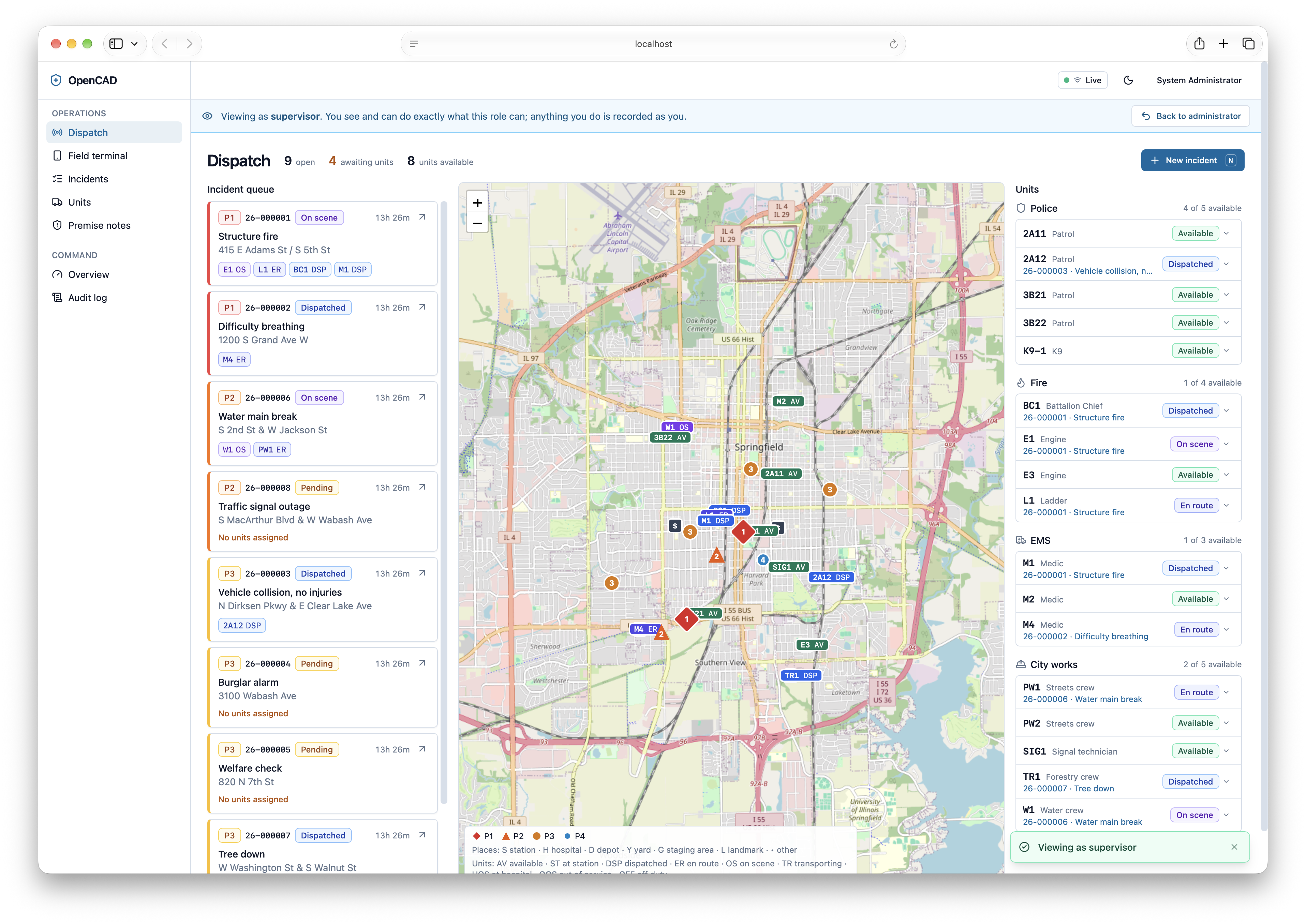
The numbers that matter, and a record of every change.
Command overview. Calls waiting for units, open P1 emergencies, unit availability by discipline, and median times to dispatch and to on scene over the last 24 hours.
Audit log. Every change, who made it and when. Entries can’t be edited or deleted, and are kept for at least a year.
Roster management. Add units, assign stations, and reopen closed incidents when needed.
For administrators
Your agency, configured from inside the app
No consultants and no configuration files.
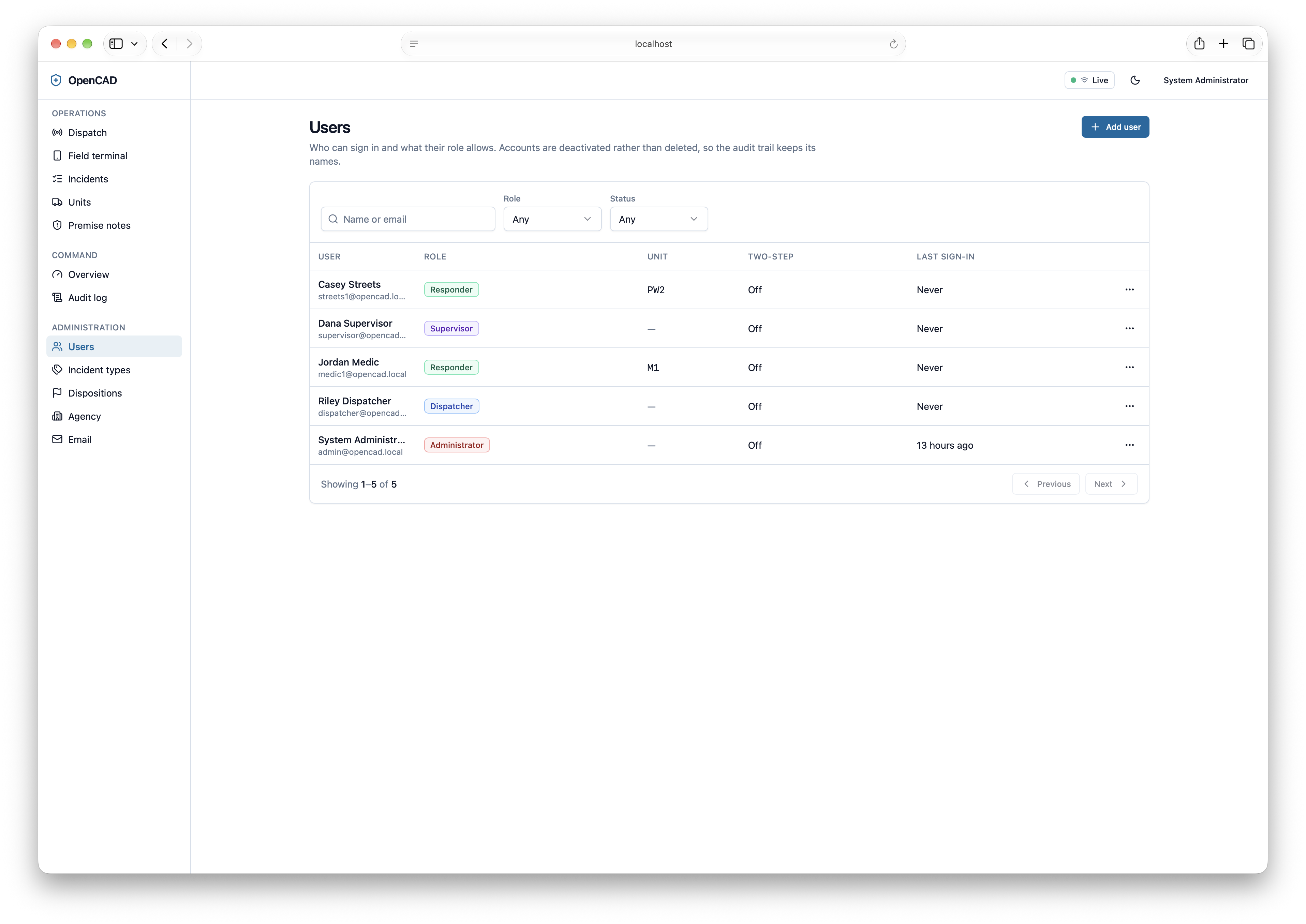
Users and roles. Administrator, supervisor, dispatcher and responder, each with clearly defined permissions. Responders are linked to their unit.
View as. Preview exactly what a dispatcher, supervisor or a unit’s crew sees, without a second account.
Your call types and dispositions. Add, rename, reorder or retire them. Past incidents keep the disposition they were closed with.
Agency settings. Name, time zone, where the map opens, the map tile provider, address search, overdue-call thresholds, and key locations such as stations, hospitals, depots, yards and staging areas.
Premise notes. By address, with categories for officer safety, hazmat, animals, medical, access codes and frequent callers, plus an optional end date.
Data retention you control. How long caller details, closed incidents and the audit log are kept.
Nightly backups. Plus a Back up now button before any change.
Email. Through your own mail server or provider, for password resets and system alerts, with a built-in test.
Security
Protection built into the foundation
Public-safety data deserves serious protection. OpenCAD is built with security in the foundation, not added afterwards.
- Two-step sign-in is required
- For administrators and supervisors, using a passkey (fingerprint, face, screen lock or security key) or an authenticator app, with recovery codes. Other users can turn it on too.
- Role-based access
- Enforced by the server on every request. Responders see caller names and phone numbers only for calls their unit was on.
- Session control
- See every device a user is signed in on, sign out one or all of them, and know that a signed-out session stops working immediately.
- Strong password handling
- Passwords are hashed with scrypt, failed sign-ins are rate-limited, and self-service password reset links work once and expire in 30 minutes.
- Encrypted secrets
- Stored credentials, such as the mail server password and authenticator keys, are encrypted at rest and never shown again.
- Hardened web security
- A strict Content Security Policy, CSRF protection on every change, and secure, HTTP-only session cookies.
- Append-only audit trail
- Of every change in the system.
Native apps for macOS, Windows and iOS
OpenCAD runs in any modern browser today. Native apps for macOS, Windows and iOS are on the way, for agencies that would rather have OpenCAD as an app on their consoles, workstations and devices in the field.
Ask us to let you know when they launchmacOS
Desktop app
Windows
Desktop app
iOS
iPhone and iPad
Pricing
One yearly fee. No limits.
Pick where OpenCAD runs. Both plans include everything, for your whole agency.
On your premises
$12,000 per year
Run OpenCAD on your own servers, inside your own network, for agencies that need their data to stay in-house.
- Unlimited users: dispatchers, supervisors, administrators and field crews
- Unlimited consoles and field terminals
- Unlimited units and incidents
- Every feature, with no per-seat charges
In our cloud
$18,000 per year
We run OpenCAD for you. There are no servers for your IT team to buy or patch, and your agency gets its own private instance.
- Unlimited users: dispatchers, supervisors, administrators and field crews
- Unlimited consoles and field terminals
- Unlimited units and incidents
- Every feature, with no per-seat charges
Reliability and operations
- Automatic nightly backups, kept for as long as you choose, plus a Back up now button before any change.
- Error-rate alerts email your administrators when something goes wrong.
- An operations runbook covering go-live, deploying and rolling back, monitoring, rotating secrets, restoring data and recovering a locked-out administrator.
- A documented REST API (OpenAPI 3.1) for integrations with your other systems.
Designed for long shifts
- Light and dark themes. Dark mode dims the map for night shifts.
- Keyboard-friendly: press N on the board to start a new call.
- Screen-reader announcements for new, overdue and safety-critical information.
- Works on desktops, laptops and tablets in any modern browser.
Frequently asked questions
Do we need to install anything?
Not on your consoles or tablets. OpenCAD runs in a web browser on dispatch consoles, supervisor workstations and vehicle tablets. In our cloud, there's nothing to install at all. On-premises, it's installed once on your own servers.
Is there a desktop or mobile app?
Native apps for macOS, Windows and iOS are coming soon. Until then, OpenCAD runs in any modern browser on desktops, laptops and tablets.
Where is our data stored?
Your choice: in your agency's private instance in our cloud, or on your own servers on-premises.
How is OpenCAD priced?
One yearly fee for your agency: $12,000 per year on your own servers, or $18,000 per year hosted in our cloud. There's no charge per user, console or unit.
Are there limits on users or units?
No. Add as many dispatchers, supervisors, crew members, consoles, field terminals and units as your agency needs.
Can we use our own maps and address data?
Yes. Choose the map tile provider and the address search service, either a public one or one you host yourself.
How long does setup take?
The first administrator account is created on a setup screen the first time OpenCAD is opened. Everything else (users, units, stations, call types and dispositions) is configured from inside the app.
Can we try it first?
Yes. A demo city with police, fire, EMS and public works units, live incidents and sample accounts can be loaded for evaluation.
See OpenCAD in action
Give your dispatchers one live picture, your crews a terminal built for the field, and your supervisors the numbers they need.